
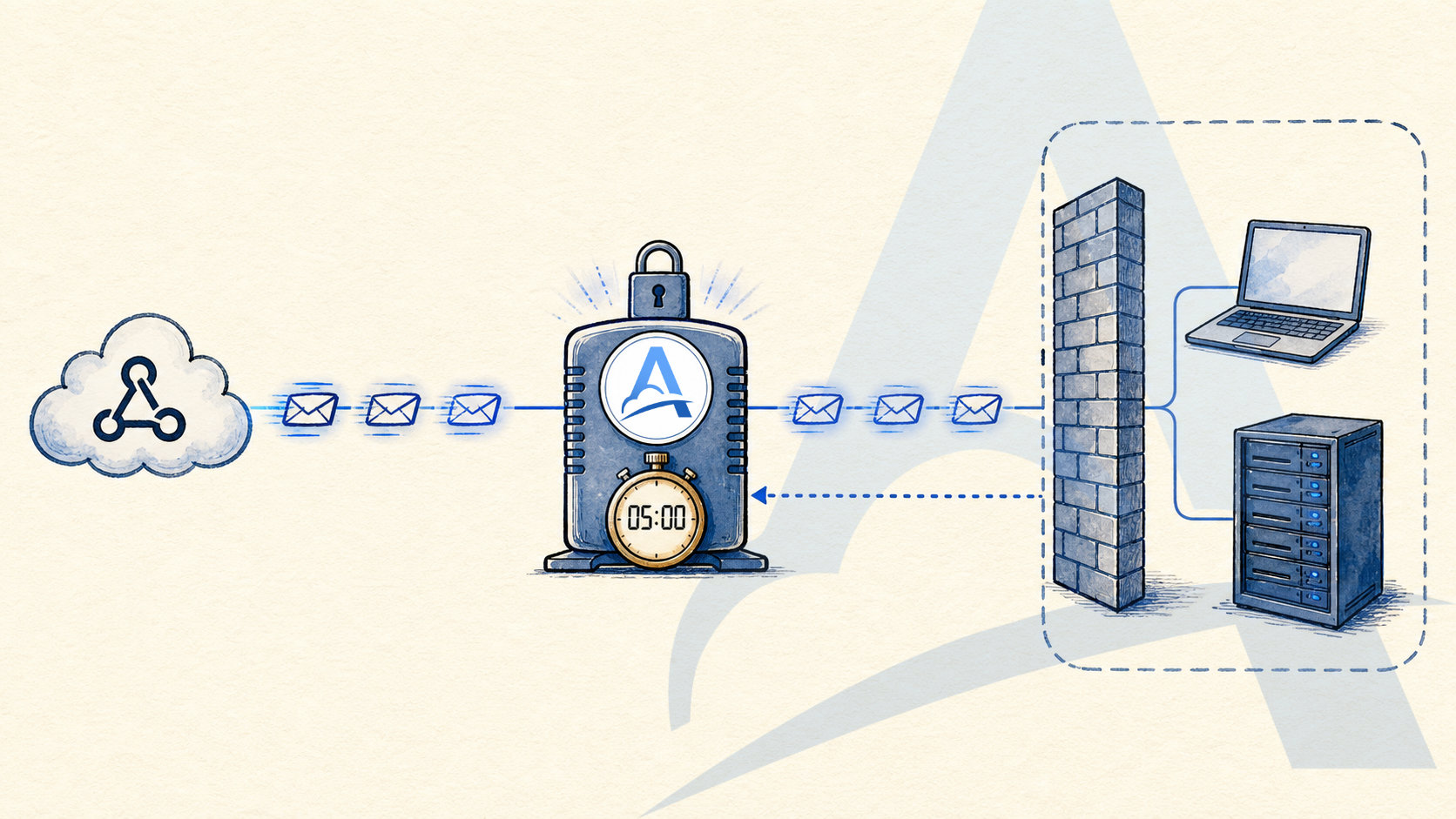
Testing webhooks becomes much easier once the sender has a public HTTPS URL it can reach. A new project rarely has one. The handler may still be running on a laptop behind NAT, DNS may not be configured, or changing an existing public server may be too risky for a quick test.
You can solve this yourself by deploying to a cloud platform or VPS, configuring DNS, TLS, and a reverse proxy, or exposing a local environment through a tunnel. These are all reasonable options, especially when they are already part of your team's workflow.
But infrastructure is not always the thing you are trying to build or prove. Sometimes you just need to confirm that a provider is sending an event, inspect the exact request, test a handler, or run a working demo. In those cases, you can start with a Server in Adal.
The same path is not limited to development. A Server can remain in the production flow as the public entry point for reliable delivery to an application inside a private network—without exposing that application to inbound internet connections.
Why opening another port is not always the answer
Sometimes it is. If your team already operates a public server and reverse proxy, you can route another hostname to a separate handler over the same port 443. TLS certificates are not tied to a port, and SNI allows multiple hostnames to share the same address.
A local machine is usually a different story. It needs an internet-reachable address, NAT or firewall rules, DNS, and correctly configured HTTPS. HTTPS can run on a non-standard port, but not every webhook provider accepts URLs that specify one. Reconfiguring a production reverse proxy or router just before a demo also introduces risk you may not need.
Adal handles this part of the flow. The Server already has a public HTTPS URL, and Adal CLI can reach a local application through a secure outbound connection.
What you can do in five minutes
Every Server in Adal gets a stable public HTTPS URL. Send a request to it from an external service or with curl, then open the resulting Request in the Adal dashboard.
The shortest path looks like this:
Sign in to Adal or create an account. Email sign-ups require address confirmation; Google and GitHub sign-ins do not.
Create a Server, choose a region, give it a useful name, and save it.
Copy the public Ingest URL.
Add that URL to the sending service, or send a test request yourself.
Open Requests and inspect what arrived.
For example:
curl -X POST https://a1b2.se1.adal.cloud/demo \
  -H "Content-Type: application/json" \
  -H "X-Demo-Source: hackathon" \
  -d '{"event":"project.created","id":"demo-123"}'
The dashboard shows the method, path, query parameters, headers, body, receive time, and delivery status. When request storage is enabled, the Request remains available for the retention period included with the current plan.
Five minutes is a practical target for getting a URL and receiving the first request, not a guarantee for every integration. Some providers require separate URL verification, signature setup, or additional permissions before they will send a webhook.
Connect the handler when it is ready
You do not need a running application just to receive and inspect a webhook. Connect the handler later through Adal CLI:
External service → Server in Adal → Adal CLI → local application
Create an Adal CLI Destination, enter the local handler URL—for example, http://127.0.0.1:3000—and run the CLI with its token. The CLI establishes a secure outbound connection to Adal, so the local application needs neither a public IP address nor an open inbound port.
This separates webhook ingestion from handler readiness. Capture the real request first, write or fix the code, and then use Replay to run the saved event through the flow again. Replay creates a new Request from the original without modifying it.
Hackathons: spend the first hour on the product, not the network
At a hackathon, infrastructure setup competes directly with the idea you are trying to build. Different parts of the team also become ready at different times: one person connects an external API, another writes the webhook handler, and someone else builds the interface.
You can give the external service a Server URL immediately. The team can see which events actually arrive and start working with real payloads while the handler is still under development. Once the code is ready, connect a local Destination through Adal CLI.
This is particularly useful when the provider generates an event only after an expensive or hard-to-repeat action. Capture the Request once and use Replay while iterating instead of reproducing the entire external workflow after every code change.
MVPs: separate the integration from the first deployment
An MVP often depends on one critical flow: a payment completes, a form is submitted, or a task is created in another system. Building a finished public ingress layer for that single flow may be premature while the application architecture is still changing.
Configure the Server's stable URL with the sender once, then change Destinations as the project evolves: a developer's machine first, a test environment next, and an internal production service later. The incoming URL stays the same for as long as the Server exists.
The integration can grow with the product. A route created for the MVP can become the permanent delivery path into private infrastructure.
Proof of concept: answer one technical question
A proof of concept is not meant to present a finished product. Its job is to remove a specific technical uncertainty. For a webhook integration, that uncertainty might be:
whether the provider sends the required event in a real workflow;
whether the payload contains the fields the application needs;
which headers and query parameters arrive in practice;
whether the request signature matches the provider's documentation;
whether the future handler can accept the real payload format and size;
whether the request can reach a private environment without a public inbound connection.
Adal preserves the incoming Request as observable evidence from the experiment. You can then use that same event while refining the handler instead of asking the provider to reproduce it every time.
That is what separates a proof of concept from general application testing: it should answer a question defined in advance. The captured Request and its delivery history give the team concrete data for that answer.
Client demos: make the flow less dependent on your laptop
A demo serves a different purpose. You are no longer exploring an unknown; you are showing a clear product flow and want it to behave predictably. Failures unrelated to the product are especially frustrating here: a tunnel URL changed, a laptop went to sleep, the local server restarted, or the latest handler build broke.
Register the Server's public URL with the provider ahead of the meeting and leave it unchanged. During the demo, the dashboard shows that the event arrived, when Adal received it, and what happened when it was delivered to the Destination.
If the local handler is unavailable, you can still confirm receipt in Adal when storage is enabled. Once the application is back, use Replay to create a new Request or manual retry to repeat a specific existing delivery.
Use test data for demos. If a webhook may contain personal data, credentials, or other sensitive information, review the storage settings, selected region, retention period, and anything that may appear on a shared screen before the meeting.
Production: deliver requests into a private network
Adal CLI is not limited to a developer laptop. It can run continuously inside a private network where it can reach an internal service by local IP address or private hostname.
A payment webhook flow might look like this:
Payment provider
    → public Server in Adal
    → Adal CLI inside the private network
    → http://10.0.20.15:8080/webhooks/payment
Adal CLI initiates the secure outbound connection. There is no need to open an inbound firewall or router port to the payment server, and the server does not need a public IP address, public DNS name, or TLS certificate to receive internet traffic.
The provider sends the webhook to the Server's public HTTPS URL. Adal receives the Request, stores it when storage is enabled, and sends it through the connected CLI to the internal Destination. The receive time, request contents, delivery status, and individual delivery results remain visible in the dashboard.
The payment server is not directly reachable from the internet. Its network address and inbound ports are not publicly exposed, so scanners and attackers cannot connect to them directly. The public connection terminates at Adal's infrastructure, reducing the internal service's direct attack surface.
Adal can also protect a Destination from traffic spikes and DDoS load with Minimum delivery interval. After sending one request to the Destination, Adal waits for the configured interval before sending the next.
Suppose Adal receives 100 requests in one second and the interval is set to 100. The internal service will receive roughly 10 requests per second, spreading the batch over about 10 seconds. Delivery is around ten times slower in this example, but the company's server does not receive the original burst. You set the interval in milliseconds.
The handler should still verify provider signatures and enforce its application-level security rules. Delivery pacing protects availability; it does not determine whether an individual request is legitimate.
There are many reasons to keep a production service private:
security policy prohibits inbound internet connections;
the application runs on-premises, in a private cloud, or in an isolated network segment;
the service has no public IP address, and changing NAT rules is not possible or desirable;
the internal handler should not terminate TLS or process public traffic directly;
a legacy application is available only on the local network;
the team wants one managed ingress point feeding several internal Destinations;
the internal service needs protection from sudden traffic spikes through controlled delivery pacing;
delivery must remain observable and retryable while the internal service is temporarily unavailable.
If the CLI disconnects, the handling of accumulated Requests depends on the Server, Destination, and retention settings. With Deliver pending requests on connect enabled, waiting Requests are delivered after the connection is restored.
Adal is more than a webhook inspector for development. It can serve as a production-ready layer between the public internet and a private system: receive a request on a stable HTTPS URL, retain it, expose its history, and deliver it predictably without opening an inbound port to the application.
Test your own webhook sender
Adal is also useful when your application sends webhooks to customers. Temporarily use a Server in Adal as the receiver and inspect the HTTP request that actually leaves your system:
method, path, and query parameters;
headers, including content type and signature;
request body and total size;
exact receive time;
spacing between requests in a sequence.
This exposes differences between the integration documentation and the sender's real behavior: a misspelled header, unexpected JSON serialization, a missing field, or retries happening too frequently.
The receive timestamp tells you when a request reached Adal. To measure end-to-end latency from event creation to receipt, include an event timestamp and correlation ID at the sender. Receive timestamps alone are not enough for an accurate end-to-end measurement.
Compare regions
A Server is created in a selected region, so you can create Servers in multiple regions for comparative delivery testing. A sender you control can send equivalent requests to each region, allowing you to compare receive times and delivery results.
This can provide an early indication of routing behavior, but it is not a rigorous network benchmark. A meaningful comparison requires consistent conditions, synchronized sender timestamps, request identifiers, and a series of measurements rather than a single webhook.
More practical use cases
Learn the real integration contract before writing code
Provider documentation usually includes a sample payload, but the real request may contain additional fields, headers, or formatting details. Capture several event types, compare them, and only then finalize the handler's data model.
Run a regression check after changing the handler
Replay a saved Request after a refactor, library upgrade, or schema change. This does not replace automated tests, but it is a fast way to run new code against a real example from the provider.
Compare an old handler with a new one
Within the limits of the current plan, one Server can deliver a Request to multiple Destinations. Send the same incoming webhook to the current and replacement handlers, then inspect each delivery independently.
Troubleshoot with an external provider
When an integration fails, the first disagreement is often whether the request was sent at all. A captured Request, receive time, headers, and delivery history separate sending, ingestion, and processing into concrete facts that both sides can investigate.
Test events that are difficult to reproduce
Some webhook events require a long sequence of actions or depend on an external process. Capture the Request once, then use Replay during development instead of repeating the entire sequence for every test.
From the first test to production
For a test project, Adal provides a fast way to get a public HTTPS URL, inspect a real webhook, and send it to a handler without separate network setup. As the project grows, the same Server can deliver Requests to test, internal, and production environments.
With Adal, the path looks like this:
create a Server → copy the URL → receive a Request → inspect it → deliver it into a private system
Start with the Adal quickstart guide. Use Adal CLI for delivery into local and private environments, and review storage and retention before choosing how long request data should remain available.