
Shared balance
Inbound and Outbound share the account traffic balance. Open the account menu → Billing (/settings/billing) to see total, free and paid balances, the next Free renewal date and available packages. The dashboard wallet is the source for its current state; do not calculate balance by counting journal rows.
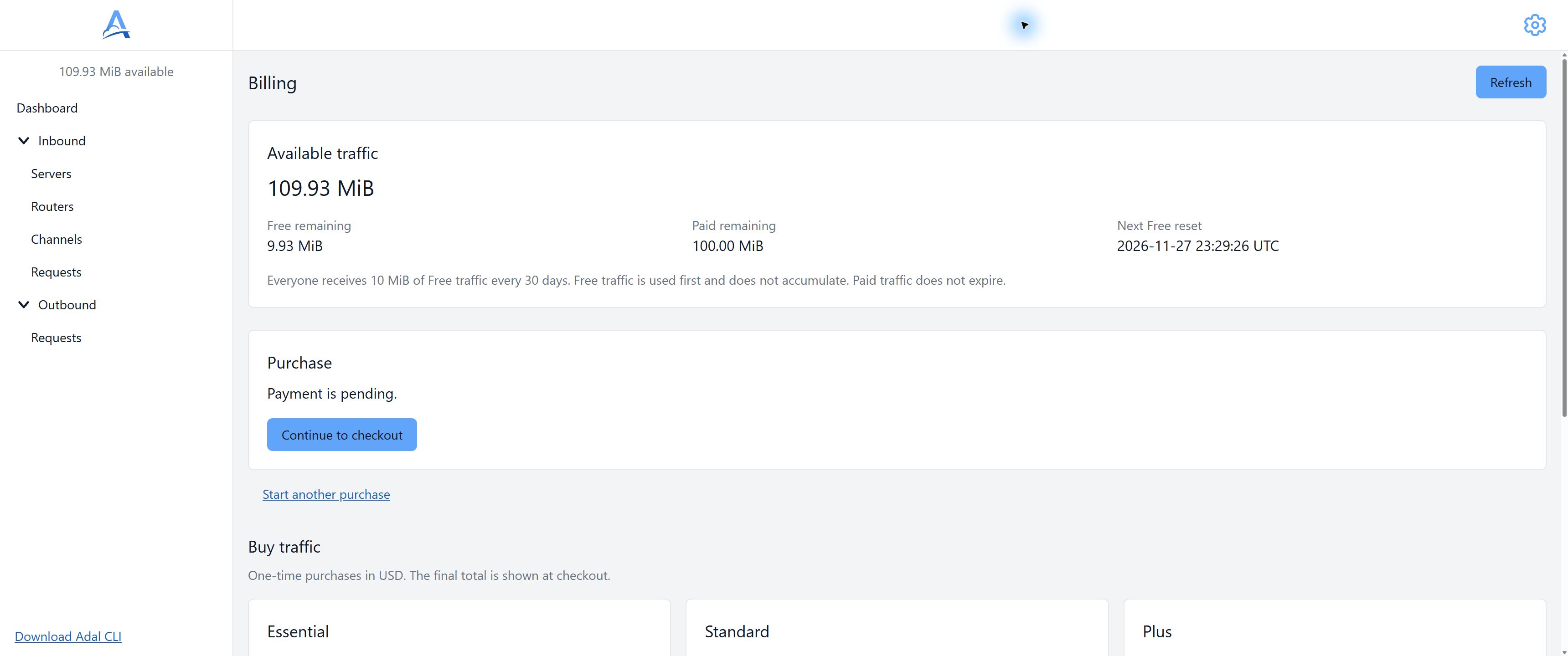
Demonstration account balances and an existing purchase awaiting payment. Values are examples; Payment is pending does not confirm payment. English interface. Open full-size screenshot.
Free balance and purchases
The first email confirmation grants 10 MiB Free. The free balance then renews every 30 days without accumulation: it is replaced with 10 MiB rather than increased by that amount. The schedule starts with the first grant; use the date in Billing, not the first day of a calendar month.
Free bytes are consumed first, then paid bytes. Purchases are one-time and additive, and paid bytes do not expire. There are no subscriptions or automatic monetary charges caused by a negative balance. See pricing and the Billing catalog for current volumes and prices.
Inbound usage
An accepted request counts bytes of its path and query, header names and values including Host and Cookie, and body. The scheme and Server address are not part of the request-target; the Host value is still counted as a header. Header formatting and chunked framing are excluded.
This is more than body size. For example, a 1000-byte body plus 300 bytes of path/query and headers consumes 1300 bytes. This is an illustrative calculation, not a promise about a specific request's size.
Rejected requests do not incur accepted-request usage. Channel count and HTTP retries do not multiply the original intake deduction.
Outbound usage
The original decoded body is counted once when the first HTTP attempt starts. Its base64 JSON string length is not that size. With the default save_response_body=false, the response is not stored and its body bytes are not charged.
With save_response_body=true, stored response bytes from each attempt are added, including unsuccessful and incomplete responses. For example, a 1000-byte original body and stored responses of 200 and 300 bytes consume 1500 bytes. The original body is not counted twice for two attempts.
Retries and recovery do not duplicate the original body charge; a separate duplicate record does not start new HTTP execution either. Reading or downloading stored data is not a new submission. Removing data or reaching expiry does not refund recorded usage.
Running out of traffic
A balance check does not reserve a hard amount for all future traffic. A positive balance can allow a whole request larger than that balance; concurrent work and delayed accounting can also lead to a negative balance.
For Inbound, a known zero or negative balance blocks new intake on quota grounds. Independent Outbound checks before the first attempt: it waits for an unknown balance and rejects a nonpositive balance without HTTP. API acceptance therefore does not prove that execution has started.
Free renewal does not erase a negative paid balance: the byte debt reduces the available total. A top-up may be needed to continue. This is not an automatic card payment.
Purchase and taxes
Open Billing and select an available package. Choosing Buy immediately creates a purchase awaiting payment; it is not a preview. Wait for Payment is pending, then choose Continue to checkout to open checkout. Do not create another purchase just to reopen its checkout page. Traffic Package prices include applicable taxes: you pay the displayed amount, with no additional tax at checkout. The server confirms the final payment result, not return-link parameters.
After returning, wait for the order and wallet to update. If the outcome is uncertain, check the existing purchase before creating multiple new orders. Refunds are handled through support; this guide does not establish new refund terms.
Check usage
Inspect the request flow, original body size and stored attempt responses. Accounting is asynchronous; historical Outbound usage may be unknown and displayed as “—”. That does not establish zero usage.
See Storage, Retries and API tokens.