
What a Server does
A Server provides a public URL for incoming webhooks. Its settings determine which calls to accept and what response to return to the sender. Channels and Endpoints define recipients; Routers connect them to Servers.
When to create another Server
Use separate Servers for different public addresses, regions or intake rules. Paths on the same address are not independent Servers. Independent Outbound API submissions do not need an incoming Server.
Create a Server
Open Inbound → Servers and the creation form (
/inbound/servers/new).Enter a useful name and select an available region. No region is selected by default.
Allow the sender's methods; keep
POSTfor the first example.Review IP and Content-Type filters and response settings, then choose Create server.
Open its details and copy the address. To deliver requests, next create a Channel with an Endpoint and a Router.
Names and notes help distinguish purposes; keep secrets out of them.
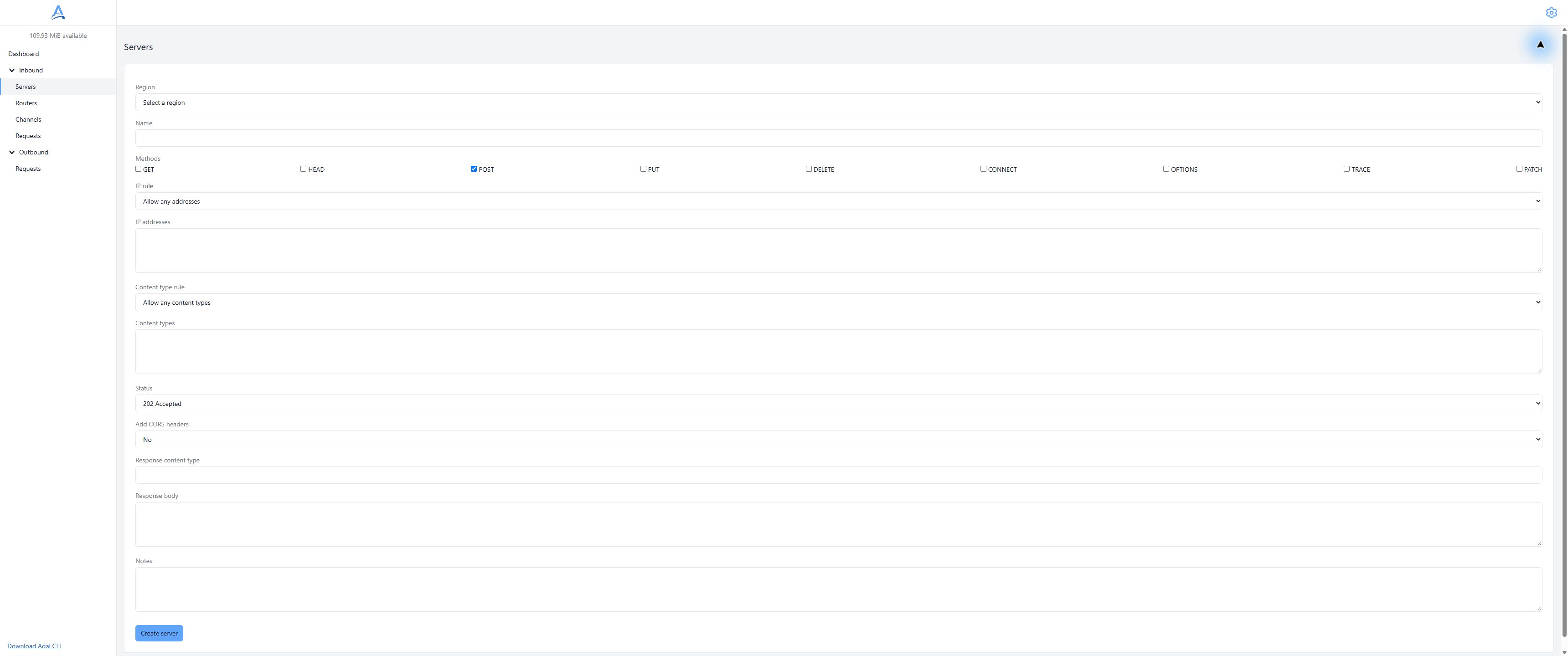
Create a Server: choose the region explicitly and configure acceptance and the sender response in one form. Demonstration dashboard, English interface. Open full-size screenshot.
IP restrictions
Mode any ignores the list, allow requires a match, and deny rejects matches. Addresses and networks follow the field's validation rules. Filtering does not replace provider signature verification in your handler.
For the first test, use a clear configuration without IP restrictions, then configure the real sender's list. IP filters do not replace verifying the sender's signature in your application.
Incoming Content-Type
Modes any, allow and deny apply to the incoming request type, not the Server response type. Matching ignores case and parameters such as charset. In allow mode, a missing or invalid Content-Type does not pass.
Sender response
Set a status, Content-Type and optional static response body. The default status is 202. Statuses 204 and 205 cannot have a nonempty body; HEAD receives no body. Intake response settings do not depend on future delivery outcomes at each Endpoint.
Add CORS headers enables CORS on responses for the matched Server; credentials are not enabled. With CORS on, OPTIONS is handled as a preflight and does not create a normal webhook record. CORS does not authenticate senders.
Address
The service generates the address; neither the address nor the region can change after creation. Use the URL from Server details, not a documentation example. A deleted address is not assigned to a new Server.
Region
Select the region at creation. Moving to another region requires another Server and a sender URL change. See Regions.
Request intake
A request passes method, IP, Content-Type and quota checks. A rejected call is not delivered to recipients. The configured successful response to the sender does not establish successful processing by your application.
Paths and query
The sender can append a path and query to the Server address. Delivery appends these to the Endpoint base URL; account for the resulting handler path. For example, base https://receiver.example/adal and incoming /demo?source=docs produce /adal/demo?source=docs at the recipient. Do not add query parameters to the Endpoint base URL itself.
Size and rejection
Inbound and Outbound have separate technical limits. On rejection, inspect the HTTP code and journal reason: 405 for method, 403 for IP, 415 for Content-Type, 429 for quota. Not all technical errors before acceptance create request records.
Usage
Accepted requests count more than the body: path/query and headers also contribute. Quota is shared with Outbound. Traffic packages do not define a separate retention period. See Traffic and balance.
Server requests
Open Inbound → Requests and select the Server and region. Details include metadata, available HTTP data and recipient history. See Requests.
Recipients
Create a Direct or CLI Channel, save its Endpoints and connect it through an enabled Router. Creating a Server or Channel alone does not configure delivery. One Server can connect to multiple Channels.
Delivery queues
Endpoints have independent work and retries. Do not rely on strict global order or immediate execution. Adding a new Endpoint does not mean forwarding all historical requests.
Replay
The current dashboard has no separate replay command. Send another demonstration event for a new test. Settings changes do not restart finished requests. Automatic retries differ from manually sending a new event.
Secure integration
Verify sender signatures in your handler and protect against repeated effects. Keep real Server addresses with secret paths, payloads, tokens and signatures out of examples and screenshots. Intake filters do not replace business checks.
Delete a Server
Remove the Server from every Router first: a disabled Router still retains its connection. Otherwise deletion returns server_in_use. Confirming Server deletion stops new intake; it does not immediately erase all previous HTTP data. See Storage.
Troubleshooting
Check the full URL, region, allowed method, filters and balance. If intake works but delivery does not, separately check the Router, Channel type, enabled Endpoint and recipient reachability from the executor.