
Start with the card
Open the submission under Outbound → Requests. The request record, summary and detailed report may appear at different times. A details error does not establish HTTP call failure. Refresh reloads the displayed information; it does not restart the job.
Summary and quota
The summary shows regional state, times, response storage, original body size and attempts. quota_admitted, admitted_at and wait_reason help distinguish admission from waiting. Unknown quota is awaited before the first attempt; nonpositive quota rejects without HTTP. API acceptance does not necessarily mean a recipient call has started.
Attempts
For each attempt inspect attempt_id, number, start/finish, HTTP status, error, read/stored bytes, body_truncated and read_complete. Unfinished values can be absent or null; they do not establish successful completion. On a network failure, the dashboard and attempt JSON can show HTTP status 0: no HTTP response was received from the recipient. Zero is not an HTTP response code; inspect the attempt error and diagnostic events.
If no attempts exist, refresh later and check waiting. For an unsuccessful call, inspect its error and the job's final state, not just one intermediate 5xx.
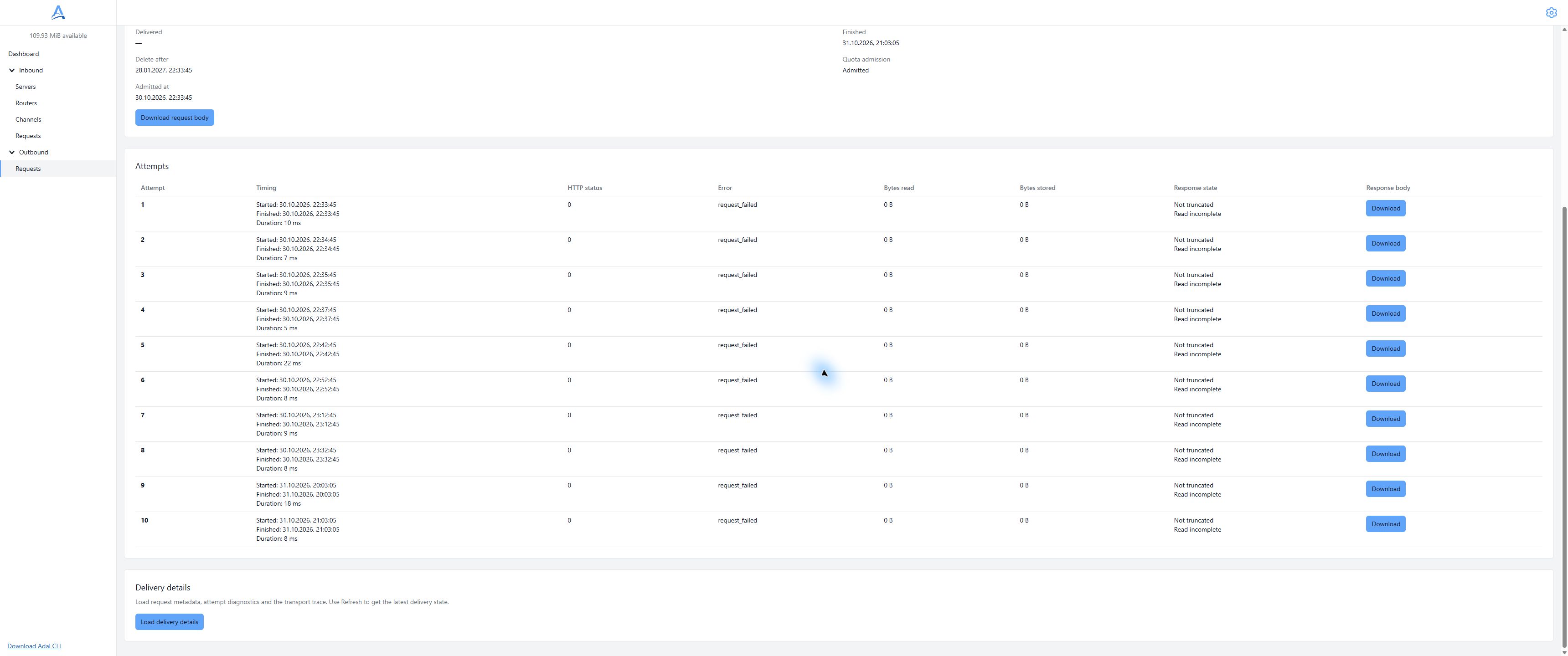
Network failure in demonstration history: HTTP status 0 requires inspecting the error and attempt details. Demonstration dashboard, English interface. Open full-size screenshot.
Dashboard details
Choose Load delivery details, then Load more details if continuation is available. The dashboard assembles request metadata, attempt diagnostics and transport events. Network/TLS/HTTP events include timing; full JSON retains remaining fields.
Request information can appear before attempt diagnostics and connection events. While Load more details is available, more report pages remain; continue loading them. One complete document does not mean that the entire report has loaded. If details changed, choose Refresh and load again. If details cannot be displayed, an absent block does not prove that an attempt never happened.
Summary API
GET /outbound/requests/{request_id}/http returns an available summary with available=true, status_version, details_revision and snapshot. Use details_revision from this response; it is neither a request identifier nor an attempt number. Reads require an API token and an empty request body.
Details pagination
Save the revision as ADAL_DETAILS_REVISION. First request:
curl --fail-with-body --silent --show-error --get \
  --header "Authorization: Bearer $ADAL_API_TOKEN" \
  --data-urlencode "details_revision=$ADAL_DETAILS_REVISION" \
  "$ADAL_API_URL/outbound/requests/$ADAL_REQUEST_ID/http/details"
The response contains available, details_revision, records and next_cursor. Continue using the same revision and the returned nonempty cursor, encoded as a query value. Do not invent cursors or read a new summary between pages. An empty next_cursor ends the sequence.
records contain json_documents_base64_fragments_v1 fragments: document, part, encoding, data, document_bytes. Document 0 is the request, 1–10 are attempts, and 11 is transport events. Decode base64 for each fragment separately, append document bytes in part order, check document_bytes, then parse complete UTF-8 JSON. The transport document is an array; others are objects. Each response is not an array of already complete documents.
Do not mix revisions or ignore missing/repeated parts or cursor loops. On 409 revision_changed, discard incomplete assembly, read a new summary and start over.
Unavailability
409 not_yet_available: data is not ready; retry reading later.409withduplicate_of: a duplicate; follow the original.available=false,reason=expired: HTTP data expired; the journal can remain.404: missing record or another account's record; check ID and access.503: temporary data retrieval failure, not a definitive HTTP delivery outcome.
Diagnostic parameters differ from journal filters: do not send page or region to /http/details.
Safe investigation
Details can contain addresses, headers and sensitive data. Do not paste complete JSON into public issues. Give support an ID, time and safe description of the stage. See HTTP data for body downloads and completeness, and retries for the schedule.