
Available content
The original request body and a particular attempt's response body are different files. Responses are stored only if the submission enabled save_response_body=true. The flag defaults to off; enabling it for a new job does not recover an old unstored response.
Diagnostics and headers load separately from bodies. A displayed size does not mean the body has already downloaded or is available.
Dashboard
Open a card under Outbound → Requests. Download request body retrieves the original body. Download on a finished attempt retrieves its stored response. For an unstored or unavailable body, the button may be absent and a state shown instead.
During a download, Cancel download cancels file reading only, not a job or HTTP attempt. Refresh and leaving the page also cancel active loads. Downloaded files are not embedded as recipient HTML in the page.
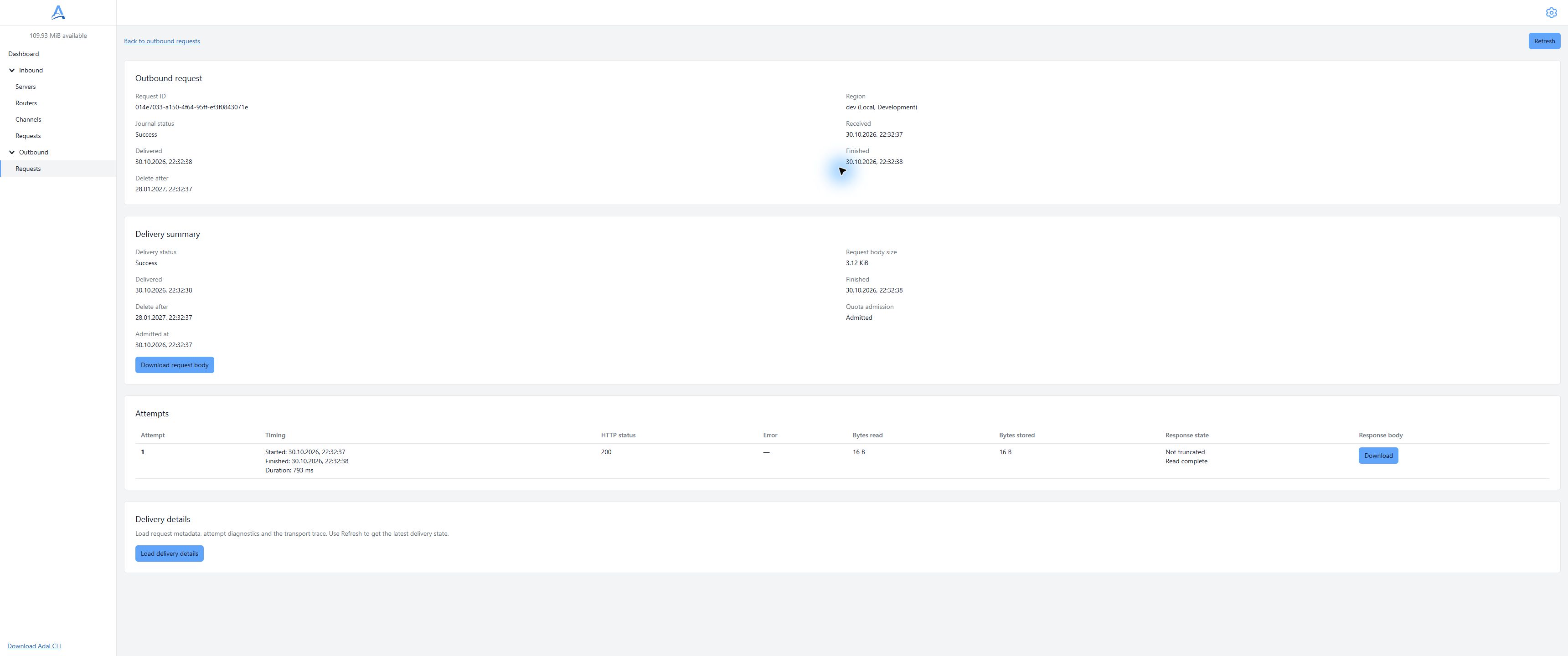
Use separate controls for the original body and attempt response; Response state shows response completeness. Demonstration dashboard, English interface. Open full-size screenshot.
Select an attempt
Read the summary, find a finished attempt in snapshot.attempts, and take its attempt_id. Do not substitute the attempt number for its UUID. Check body_bytes_stored, body_bytes_read, body_truncated and read_complete.
Request body API
curl --fail --silent --show-error \
  --header "Authorization: Bearer $ADAL_API_TOKEN" \
  --output request-body.bin \
  "$ADAL_API_URL/outbound/requests/$ADAL_REQUEST_ID/body"
The response contains original binary bytes, not JSON or base64. The quickstart file contains hello, not aGVsbG8=. An empty original body is valid.
Attempt response API
curl --fail --silent --show-error \
  --header "Authorization: Bearer $ADAL_API_TOKEN" \
  --output response-body.bin \
  "$ADAL_API_URL/outbound/requests/$ADAL_REQUEST_ID/attempts/$ADAL_ATTEMPT_ID/response/body"
Both GETs require an API token and accept neither query parameters nor a nonempty request body. HEAD is also supported on body paths to read headers, but it does not establish that the client received a complete file.
Completeness
Do not trust a file as complete merely because it exists on disk. Check client completion, expected length where Content-Length exists and absence of stream interruption. Do not use a partially written file after an error as a finished result. Absence of Content-Length is not inherently an error: chunked transfer is allowed.
Separately inspect the summary: a stored body can be truncated and the original response incompletely read. Successfully downloading a stored fragment does not turn it into the recipient's complete response. Failed-attempt responses can also be stored and contribute to usage.
Unavailability and errors
| Read response | Meaning and action |
|---|---|
409 response_body_not_saved |
Storage was off; the body will not appear later |
409 not_yet_available |
Not ready; inspect the attempt and retry reading later |
409 with duplicate_of |
Read the original's data, not the duplicate's |
410 |
HTTP data retention expired |
404 |
Check request/attempt IDs, ownership and data existence |
503 before the response starts |
Temporary read failure; retry reading, not submission |
Once streaming starts, errors can appear as an interrupted connection without a JSON error appended to the file. Do not rely only on the initial HTTP 200.
Retention, usage and security
Downloads do not extend retention or create new submissions. Expiry does not refund recorded bytes. Stored responses from all attempts contribute to usage when enabled. Keep files protected, do not open unknown content as trusted HTML, and keep tokens, bodies and personal data out of public screenshots.