
Open the journal
Choose Outbound → Requests (/outbound/requests) in the dashboard. Lists and cards use your account session; an API token is for external applications, not dashboard sign-in. Removed or expired HTTP content does not necessarily hide its journal row.
Filters
Choose region, status and time order. Filters and page are stored in the URL; changing a filter returns to page one. The region catalog supplies names, but a record's or selected region can remain in the filter during catalog failure. An empty filtered result does not establish that there are no submissions.
List cards show region, status, date and usage. “—” means unknown usage, not zero. Accounting can arrive asynchronously; check balance in Billing.
Status meanings
| Status | Meaning |
|---|---|
received |
The job is recorded; no execution outcome yet |
delivering |
Execution started or attempts remain |
success |
The recipient returned a successful HTTP response |
failed |
Execution finished unsuccessfully |
rejected |
Execution rejected the job, for example for nonpositive quota before the first attempt |
duplicate |
This call duplicates a submission; inspect duplicate_of |
A network failure reading a card is not a job status. API validation response 400 is not a journal rejected record. partial belongs to Inbound with multiple recipients, not this journal.
Card
Open a submission by ID. Check region, acceptance time, outcome and deletion deadline. The summary or bodies can be temporarily unavailable while the request remains visible in the journal. Choose Refresh to reload the information. It does not resubmit the job or trigger a manual retry.
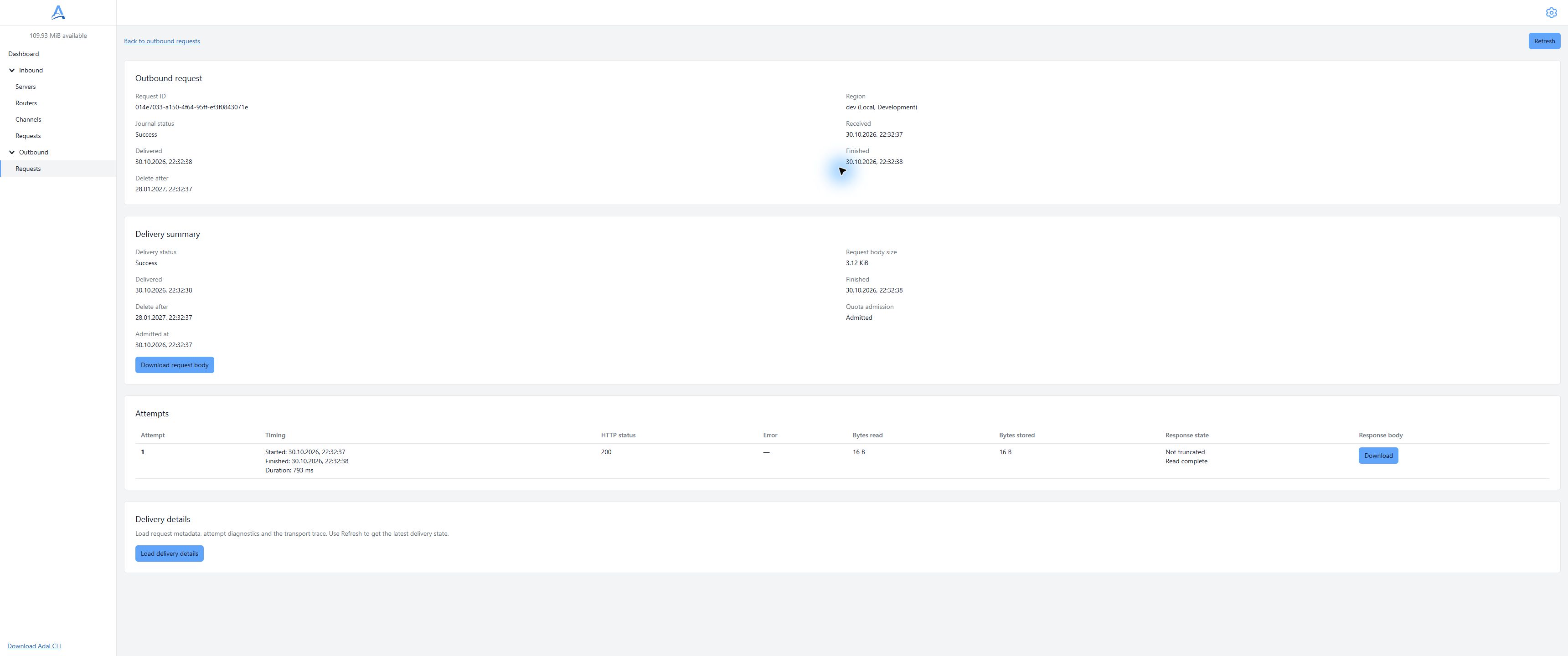
Successful submission: journal status, execution summary and attempts are shown separately. Demonstration dashboard, English interface. Open full-size screenshot.
Duplicate
duplicate_of points to the original in the same account. Follow that link to investigate its attempts. A duplicate has its own journal ID but no new HTTP data of its own. Its data-read API can return 409 with duplicate_of; do not treat it as another execution reconstructed from current settings.
One original can still have multiple HTTP attempts. Submission deduplication does not provide exactly-once external effects.
Journal API
curl --fail-with-body --silent --show-error \
  --header "Authorization: Bearer $ADAL_API_TOKEN" \
  "$ADAL_API_URL/outbound/requests?status=failed&order=desc&page=1"
The response contains records and pages. Parameters are region as a UUID, a table status, order=asc|desc, and a positive page number. Use GET /outbound/requests/{request_id} without query for the card; it adds delete_after. Send an empty GET body.
Record creation after 202 is asynchronous. For 404, check the ID, account/token and environment; retry reading later for a newly accepted submission. Do not treat every 404 as permission to repeat a business action with a new key.
Expiry
The is_deleted flag and delete_after describe HTTP data availability. Expiry does not reverse a successful external effect or zero recorded usage. A retained journal row cannot recover a body.
See diagnostics, HTTP data, storage and retry rules.